
New here? Read how ChatDuo works and our safety tips first.
Monkey App Alternative: No Download Needed
ChatDuo is a Monkey app alternative that runs in your browser: nothing to download, no account to create, free, and 18+ with Report and Block in every chat.
Last reviewed: 12 November 2026
What Monkey does well
Here is a fair look at what Monkey does well and where ChatDuo differs, checked against monkey.app on the day of writing. Monkey (monkey.app) is a random video chat for talking to strangers, and its homepage lists live video and text chat, in-chat reporting during or after a match, blocking controls and an 18+ community policy. It lists web and Android access and sends iPhone and desktop users to the browser version. Its Omegle page also lists interest matching and a DUO mode for chatting together with a friend.
Monkey asks you to sign in before you start. Its homepage FAQ explains that the one-tap social login is there to keep bots out; the trade-off is one more login to manage before you start. Monkey also publishes a Safety Center that describes its AI-assisted moderation and its reporting and blocking controls.
Why ChatDuo works as a Monkey app alternative
Nothing to install
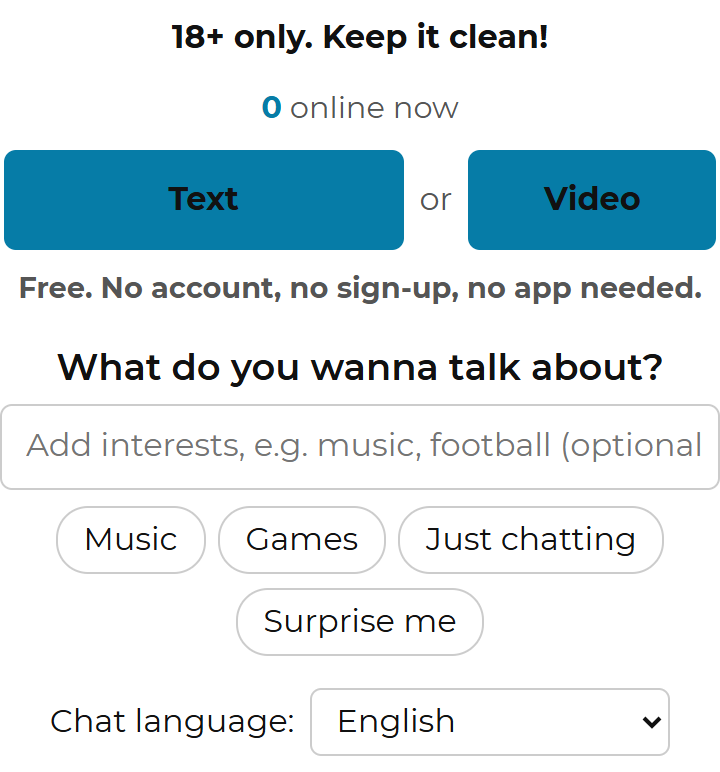
ChatDuo is a web page. Open it in Safari, Chrome, Firefox or Edge on a phone or a computer and the start panel is already there: no app store, no update to wait for, no permissions beyond the camera and microphone you grant for video.
No account, no social login
There is nothing to sign in to. You pick Text or Video, confirm your age once per browser tab, and press Start. The flip side: there is no profile to come back to.
Text or Video, your choice
Text chat is a full mode on ChatDuo, not an add-on to video. Pick it when you have no camera, a slow connection, or simply prefer typing. Our free text chat with strangers page explains how it works.
Report and Block in every chat
Report picks a reason and ends the chat; Block ends it, and the two of you are never matched again. When several different people report the same person within 24 hours, that person is banned automatically, and the ChatDuo team reviews flagged sessions.
Free with nothing to buy
No coins, no premium tier, no time limit. The start panel says it in one line: Free. No account, no sign-up, no app needed.
What ChatDuo is not
ChatDuo has no DUO mode, no group rooms, no app, and no gender or country filters today. Matching is random, with optional interests that look for a shared topic first and fall back to anyone after a short wait. Automated video moderation is not switched on today; moderation relies on reports, automatic bans and team review.
Side by side
| Feature | ChatDuo | Monkey |
|---|---|---|
| Where it runs | Browser on phone and desktop; no app | Android app and a web version; iPhone and desktop users are sent to the browser version |
| Account needed | No | Yes, a one-tap social login |
| Text chat | Yes, Text or Video as equal modes | Yes, video and text chat options |
| Age policy | 18+ only, confirmed before the first chat | 18+ required, per its community policy |
| Report and block | Report and Block in every chat; automatic bans after repeated reports | In-chat reporting during or after a match; blocking controls |
| Automated moderation | Not switched on today; reports, automatic bans and team review | AI-assisted moderation, as Monkey describes it |
| Interests | Optional interests, random fallback | Interest matching, listed on its Omegle page |
| Group or duo chats | No; one-on-one only | DUO mode listed on its Omegle page |
| Gender or country filters | Not today | not shown |
| Cost | Free, nothing to buy | not shown |
Switch in ten seconds
Open ChatDuo in your browser
Go to the ChatDuo homepage or scroll up on this page. There is nothing to download and no store account to log into; the same page works on a phone or a computer.
Pick Text or Video and press Start
Add an interest or two if you like, choose your chat language, and confirm you are 18 or older. For video, your browser asks once for the camera and microphone.
Next, Stop, Report or Block
Next moves you to a new stranger, Stop ends the session, and Report or Block handle anyone who breaks the rules. On a phone you can also swipe to skip. The how ChatDuo works page covers every control and the troubleshooting steps.
Is the Monkey app safe?
Monkey states that it is for people 18 and older, that it uses AI-assisted moderation, and that reports can be filed during or after a match. Those are Monkey’s own statements and we have no way to measure how well they work in practice. What we can say is that no random chat, Monkey or ChatDuo included, is free of risk: you are talking to a stranger, and on video that stranger can see and hear you.
The questions worth asking of any random chat are the same: does it say 18+ before you start, can you report and block inside the chat, what is stored about you, and is the video recorded? On ChatDuo, video and audio travel between the two browsers over WebRTC and are not recorded by ChatDuo, although the other person could record their own screen. Messages are relayed live and not kept after the chat. Our safety page lists our safety tips.
18+ only. ChatDuo is for adults. If you see someone who looks under 18, use Report in the chat and then tell us through the contact form; those reports are prioritised.
Other Monkey app alternatives and Omegle
Monkey calls itself an Omegle alternative, and so does ChatDuo: our Omegle alternative page explains what is the same as the old Omegle and what is deliberately different. The random chat alternatives hub compares ChatDuo with OmeTV, Chatroulette and Emerald Chat on the same criteria used in the table above.
Frequently asked questions
Is there a Monkey app alternative that needs no download?
Yes. ChatDuo is a random video and text chat that runs entirely in the browser, so there is nothing to download on a phone or a computer. Open the page, pick Text or Video, confirm you are 18 or older and press Start. Monkey offers an Android app and a web version; ChatDuo is web only, by design.
Is there a Monkey app for PC?
Not as an app: Monkey itself points desktop users to its web version, and ChatDuo works the same way on any PC or Mac with a modern browser such as Chrome, Firefox, Edge or Safari. For video, allow the browser to use the webcam and microphone when it asks. Text chat needs no camera at all.
Do I need an account on ChatDuo?
No. ChatDuo has no accounts, no profiles and no social login. Monkey asks for a one-tap social login before you start; on ChatDuo you only tick a box confirming you are 18 or older and agree to the rules, once per browser tab. ChatDuo keeps no profile for you; every visit starts from the same start panel.
Is the Monkey app safe?
Monkey says it is 18+, uses AI-assisted moderation, and lets you report during or after a match. We cannot verify how those tools perform. Treat any random chat, ChatDuo included, as a conversation with a stranger who can see and hear you: share nothing identifying, skip early, and report rather than argue.
Is ChatDuo free?
Yes, with nothing to buy: no coins, no premium tier and no time limit. Bans cannot be lifted by paying, and appeals are free through the contact form. We could not find pricing on the Monkey homepage on the day of writing, so the table above marks its cost as not shown rather than guessing.
Which apps like Monkey work on an iPhone?
Monkey lists web and Android access on its homepage and sends iPhone users to its web version. ChatDuo also runs in Safari on iPhone with no install: video shows on top and the chat below, and you can swipe to skip to the next stranger. Allow the camera and microphone when Safari asks, and you are in.